
AI templates are transforming content creation by automating repetitive tasks, cutting production time, and maintaining brand consistency. Here’s how they help:
- Save time: AI tools reduce first-draft creation by up to 80%, saving hours on tasks like formatting, SEO, and creating variations.
- Simplify workflows: Automate tedious steps like layouts, outlines, and keyword placement, freeing up time for high-priority tasks.
- Ensure consistency: Templates lock in brand elements like tone, colors, and logos, ensuring uniformity across all platforms.
- Boost efficiency: Tasks like creating 100 ad variations or localizing campaigns for multiple markets now take minutes instead of days.
AI tools like Draft AI allow creators to input raw data, choose from tailored templates, and produce polished content in minutes. Whether it's social media posts, email newsletters, or carousels, these tools simplify the process while maintaining quality. For creators, this means less time spent on manual work and more time for strategic decisions.
Ultimate AI For Content Creation Workflow [TUTORIAL]
How AI Templates Save Time for Creators
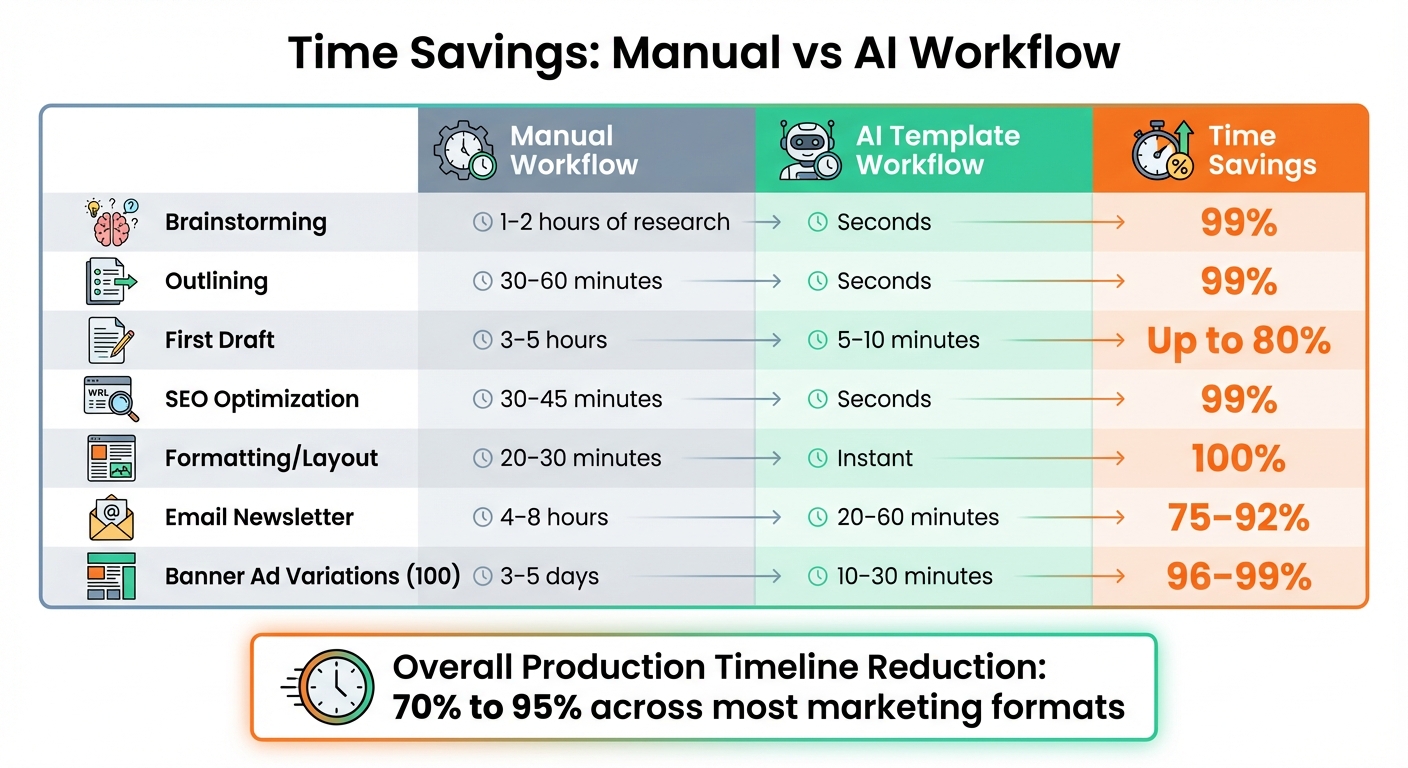
Manual vs AI Workflow Time Savings Comparison
AI templates do more than just speed things up - they revolutionize how creators approach their work by taking care of the monotonous, time-consuming parts of content creation. By offering a structured starting point, they eliminate much of the busywork, freeing up time for the creative decisions that matter most.
AI tools can cut first-draft creation time by as much as 80%, improve performance by 58%, and save marketers at least an hour on creative tasks. This shift transforms workflows, making content production faster and more efficient. Here's a closer look at how AI templates streamline tasks, reduce production time, and ensure consistency.
Automating Repetitive Tasks
The true power of AI templates lies in their ability to handle repetitive, low-value tasks. Formatting, adjusting layouts, structuring sections, and placing keywords are essential but often tedious steps in content creation. These tasks, which can take hours, require minimal creativity. AI templates automate them, allowing you to focus on strategy and creative elements that define your brand.
Think about the small but time-draining tasks you face daily: writing meta descriptions, building content outlines, tweaking layouts for different platforms, or generating multiple headline variations. AI templates tackle these in seconds, saving you the 30–60 minutes they might otherwise take. This automation reduces mental fatigue, freeing you from constant formatting decisions and ensuring brand guidelines are followed effortlessly.
"AI is a force multiplier for creative expression."
– David Raichman, Creative Director, Ogilvy
Modern AI tools can even learn your brand voice. By uploading past content and brand guidelines, you can train templates to replicate your tone and style. This means your social posts, email newsletters, and video scripts stay consistent with your brand's identity - without the need for endless manual adjustments.
Reducing Production Time
AI templates significantly speed up content production timelines. Tasks that once took hours or even days can now be completed in minutes. For example:
- Social media posts: Reduced from 30–60 minutes to 1–5 minutes.
- Email newsletters: Cut down from 4–8 hours to just 20–60 minutes.
- Creating 100 ad variations: Takes 5–10 minutes instead of days.
- Localizing campaigns for 20 markets: Completed in hours rather than weeks.
By automating these processes, AI templates free up time for creators to focus on high-value work.
Maintaining Consistency Across Content
Managing consistency becomes challenging when producing large volumes of content across multiple platforms or with various team members. AI templates solve this by locking in essential brand elements - like logos, colors, fonts, and tone - while still allowing flexibility for customized content. This ensures your brand voice stays intact, whether you're crafting a blog post, email sequence, or social media update.
The impact is clear: 79% of content marketers report improved content quality with AI assistance. The business benefits are measurable too. Vanguard, for instance, used the AI platform Persado to personalize its advertising language while staying within strict industry regulations. This approach led to a 15% increase in conversion rates. Additionally, companies using AI for personalization see 40% higher revenue compared to those that don’t.
Time Comparison: Manual vs. AI Workflow
The contrast between traditional methods and AI-assisted workflows is striking when you break down the time spent on each task. Here’s how they compare:
| Task | Manual Workflow | AI Template Workflow | Time Savings |
|---|---|---|---|
| Brainstorming | 1–2 hours of research | Seconds | 99% |
| Outlining | 30–60 minutes | Seconds | 99% |
| First Draft | 3–5 hours | 5–10 minutes | Up to 80% |
| SEO Optimization | 30–45 minutes | Seconds | 99% |
| Formatting/Layout | 20–30 minutes | Instant | 100% |
| Email Newsletter | 4–8 hours | 20–60 minutes | 75–92% |
| Banner Ad Variations (100) | 3–5 days | 10–30 minutes | 96–99% |
These aren’t hypothetical numbers - they reflect real-world results achieved with AI templates. Overall, AI tools can reduce production timelines by 70% to 95% across most marketing formats. This means more time for creators to focus on strategic and creative work that drives results.
Creating Social Media Posts with Draft AI Templates
Draft AI takes the hassle out of social media content creation, turning your ideas into polished posts in no time. It eliminates the tedious back-and-forth of traditional workflows, making it easier than ever to publish engaging content.
Adding Raw Data or Voice Notes
Getting started is straightforward. You can input your ideas in various ways - type out text prompts, upload raw data, or even record voice notes. This flexibility means you can jot down quick bullet points at your desk or capture ideas on the go, like during your commute. You can also upload files such as product specs or press releases to enrich your content. Once your input is ready, you can easily pick a template that suits your creative vision.
Selecting and Customizing Templates
After submitting your input, Draft AI offers a wide selection of templates organized by platform (LinkedIn, Instagram, Facebook, Twitter/X, TikTok, YouTube) and content type (like announcements, educational posts, or opinions). This makes it easy to find the perfect starting point for your post.
Draft AI also tailors the content to match your unique voice and tone. With tools like "rewrite brushes", you can adjust the tone, simplify text, or make it more engaging. Additionally, you can customize fonts, colors, and layouts to align with your brand identity. Want visuals? Draft Art can generate them for you. The platform even handles platform-specific formatting - adapting content for Twitter’s character limits, LinkedIn’s professional tone, or Instagram’s image-focused style - saving you from manual edits. Once you've fine-tuned your post, you’re ready to move on to the final touches.
Exporting and Publishing Content
Draft AI’s built-in editor ensures your content is polished, checking for spelling and grammar errors. It also creates visuals that complement your text. When everything is ready, you can export your post with optimized layouts for platforms like LinkedIn, complete with size adjustments and smart formatting.
This streamlined, AI-powered process makes it easier to manage multiple social accounts or maintain consistent daily engagement, cutting down on the time and effort needed to go from idea to published post. It’s a game-changer for busy content creators.
Creating Carousels and Scripts with Draft AI Templates
Draft AI makes creating carousels and scripts faster and easier, helping you produce engaging content without the usual hassle. These tools are especially handy for crafting multi-slide carousels and structured scripts that require more thought than a simple post. With Draft AI's templates, your raw ideas are transformed into polished, ready-to-use content.
Designing Carousels for Better Engagement
Carousels are a great way to present complex ideas in a more digestible format. Draft AI simplifies the process by pulling key insights from your long-form content and organizing them into 5–7 slides. The first slide grabs attention with a strong hook, while the last slide wraps things up with a clear call-to-action.
To enhance your visuals, Draft Art generates AI-powered images and illustrations that match your content. It also takes care of design details like padding, font scaling, and color contrast, so you don't need to be a design expert. Plus, you can save your brand colors, fonts, and logos to ensure all your slides stay consistent. Whether you're using Instagram's square (1:1) ratio or exporting a PDF for LinkedIn, Draft AI adjusts everything to fit the platform perfectly.
The first slide is crucial - using a bold statement or an unexpected insight can stop a viewer mid-scroll. Keeping slides uncluttered with plenty of white space and concise text ensures mobile users stay engaged. Draft AI helps by suggesting shorter phrases and optimizing layouts for readability, making your carousels more effective.
Writing Scripts with AI Assistance
While carousels are great for visual storytelling, Draft AI's script-writing tool focuses on creating structured, narrative-driven content.
Draft AI can generate professional scripts tailored to your personal writing style and audience. Simply provide raw data or voice notes, and the tool uses your past writing samples to replicate your unique tone. This ensures your scripts sound like you - not like a generic template.
For more control, you can break the script creation into steps: start with the hook, refine the story beats, and finish with the call-to-action. This modular approach lets you fine-tune each part of the script. You can also adjust the tone instantly using rewrite brushes, whether you need something more professional, casual, or engaging. The result? A well-structured script that aligns with your brand voice and requires minimal editing, making it ready to record or publish in no time. Draft AI keeps your workflow efficient while elevating your content creation game.
Customizing Draft AI Templates for Better Results
Using AI-Driven Personal Writing Styles
Draft AI takes a deep dive into your past content to learn your unique tone and style. By providing specific details - like your brand’s mission, target audience, and preferred style - you can guide it to create content that genuinely mirrors your voice. This approach keeps you from churning out bland, cookie-cutter posts that blend into the noise.
Let’s say you want to write about productivity. Instead of using a vague prompt like "write a post about productivity", try something more specific: "Create a casual, motivational post about productivity aimed at freelance designers struggling with time management." That extra detail helps Draft AI align the content with your brand’s personality. Research backs this up - 71% of consumers expect businesses to treat them as individuals, and companies that excel at personalization see 40% more revenue from those efforts.
Once the content is generated, you can use Draft AI's rephrase tool to fine-tune the tone - whether you want it to sound professional, witty, or conversational. This collaboration between you and the AI ensures the final result feels authentic and human. As John Thomas from Draft.co puts it:
"Think of AI content creation like flying an airplane - autopilot does a lot of the work, but there's always a human in the cockpit making flight adjustments".
This level of personalization doesn’t just polish your local content; it also sets the stage for adapting it seamlessly to international audiences. By reducing the need for heavy manual edits, these tools save time and keep your workflow efficient.
Translating Content for Global Audiences
Draft AI takes your personalized content a step further by adapting it for international markets. With translation templates, you can set preferences for languages, glossaries, and tone, ensuring every translated piece stays consistent with your brand.
The system also handles technical details like adjusting dates, times, and number formats to match local standards. For instance, if you’re translating for a French audience, Draft AI automatically formats dates in the European style - no manual tweaks needed. You can even attach brand glossaries to maintain consistency with technical terms and product names.
Tracking Time Savings with Draft AI Analytics
Knowing how much time you're saving with AI templates can help streamline your workflow and validate your investment. While Draft AI doesn’t offer a real-time analytics dashboard, you can still measure efficiency by comparing your manual process to the AI-assisted one. On average, creators save about 2.5 hours each day with AI tools, which translates to over one full workday saved every week. This data highlights how AI templates can significantly enhance your productivity.
Start by timing a typical manual task and comparing it to the AI-assisted version. For example, creating a social media post manually - factoring in research, drafting, and editing - might take around 45 minutes. With Draft AI, that same task typically drops to just 15–30 minutes. That’s a time reduction of 50% to 66% for a single piece of content.
Now, let’s scale that up. If you produce 20 posts a month and save 30 minutes per post, that’s 10 hours saved per month. Over the course of a year, this adds up to 120 hours, or roughly three full workweeks of time saved.
It’s also helpful to keep an eye on revision cycles. If you find yourself revising frequently, it might be worth tweaking your input prompts to improve accuracy. Identifying which parts of your workflow benefit the most from AI - and where human oversight is still essential - can help you fine-tune your process.
Finally, calculate your return on investment (ROI). For instance, if Draft AI saves you 10 hours a month and you value your time at $50 per hour, that’s $500 in saved labor costs. When compared to the subscription fee, the savings can easily outweigh the cost, making it a practical addition to your toolkit.
Conclusion
AI templates are changing the game when it comes to content creation by automating repetitive tasks. They don’t just shave a little time off the process - they completely reshape workflows, making them faster and more efficient.
What’s the real benefit? These tools allow you to step back from the mundane and focus on what truly matters: strategy, creativity, and building a genuine connection with your audience. As Dave Eagle from Type.ai aptly says:
"If AI is a writer's turbocharger, then templates are the premium fuel".
Take Draft AI, for example. Its ready-made templates transform raw text or voice input into polished content, slashing production time while ensuring your brand’s voice remains intact. This approach creates a smoother, more productive content creation process.
The time savings are tangible. Whether you’re churning out 20 posts a month or managing content across several platforms daily, AI templates can help you reclaim hours each week. Those hours can then be redirected toward high-value tasks like refining your brand voice or crafting impactful strategies. Think of these tools as your autopilot, keeping things on track while you fine-tune the bigger picture.


